Guide Dogs’ advice on safe headphone use
When travelling independently, it’s essential that you’re aware of your environment and surroundings. This awareness can be impacted when using headphones, particularly over-ear or inner-ear models. Guide Dogs recommends using open-ear headphones so you can still hear changes to your environment, such as traffic, while using technologies to support and enhance your independent mobility.
Using technology for navigation should support and enhance your skills, not replace them. Ensure that any additional information provided by technologies – and the concentration required to use the technology – doesn’t impact your core orientation and mobility skills.
Using headphones with a guide dog
It’s your responsibility to ensure the safety and wellbeing of your guide dog – keep this in mind when you’re deciding whether to wear headphones when you’re out and about with them. You should always have a strong awareness of your surroundings, particularly when you’re walking near to or crossing a road.
Different types of headphones
Before you think about factors such as the brand, comfort level, or technical specifications, you’ll need to decide which type of headphone you’d like.
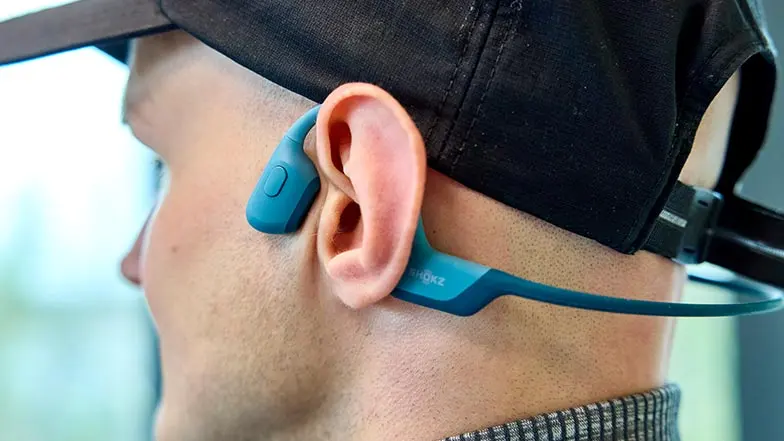
- Open-ear: Open-ear headphones sit outside your ear. The sound is transmitted to your ear either through bone conduction technology or through the air. For bone conduction headphones, the earpieces sit in front of your ear and are usually connected by a thin, rubberised band which sits around the back of your head. Other open-ear headphone buds will sit in your outer ear and stay in place with an ergonomically designed ear hook.
- Inner-ear: Inner-ear headphones, also called ear buds, are inserted into your ear. They’re much smaller, more subtle, and more transportable than other types of headphones. The left and right earpieces might be connected by a wire, or they might be independent of one another.
- Over-ear: Over-ear headphones cover your entire ear. The surface touching your ear is called an ear cushion and it’s usually soft and padded. The ear cups are large and protrude more than the ear cups of other types of headphones, and the two are usually connected by a band that goes over the top of your head.
Loading video...
Loading video...
In this video, Sam, who has a vision impairment, navigates new routes with the help of assistive technology, Shokz bone-conducting headphones, and his guide dog Henri.
Open-ear headphones
Although all the following headphones are classified as ‘open-ear’, keep in mind that it’s only bone-conducting headphones, neck headphones, or audio glasses that leave your ear completely open to hear your surroundings.
Shokz offer a variety of open-ear headphones that use bone conduction to transmit sound to your ear.
- OpenMove: These headphones have the lowest price point of all Shokz’ bone conducting, open-ear headphones. They’re sweatproof, have a 6-hour battery life, use a USB-C charging port, and have a VocalBooster mode – perfect for podcasts.
- OpenRun: A step up from the OpenMove model, these headphones have an 8-hour battery life, are waterproof (but not suitable for swimming), and have a quick-charge function whereby you can get 1.5 hours of listening time after a 10-minute charge. This model comes in two sizes, so you can choose the best fit for your head.
- OpenSwim: Designed specifically for swimming, these headphones fit comfortably under a swimming cap and can endure submersion in 2 meters of water. They also offer 8 hours of battery life but don’t have fast-charging capabilities.
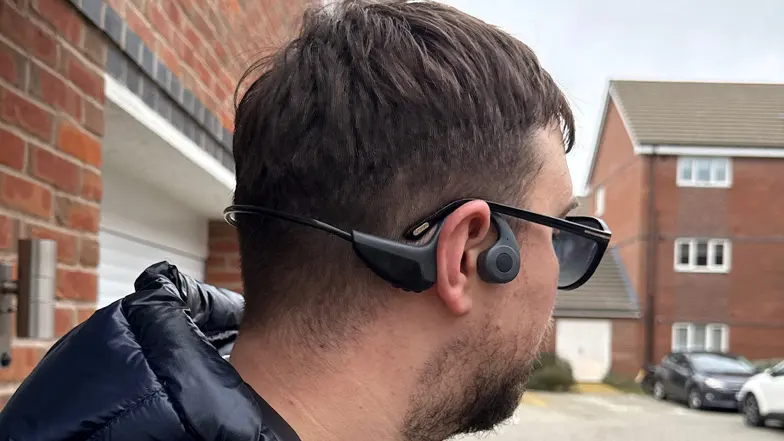
These headphones are air-conducting, so they act as small but powerful speakers that sit close to your ear canal. Users report that the sound quality is good and the battery life is excellent. This model is water resistant.
Olodance offer a range of air-conducting headphones that are reported to have an impressive battery life, good water resistance, and minimal sound leakage.
- OW1: You can expect 16 hours of battery life after 1.5 to 2 hours of charging time. These headphones have a waterproof rating of IPX4 which means they’re splash resistant.
- OWPro: Similarly, these headphones offer a 16-hour battery life, but come with the added benefit of a charging case that provides an additional 58 hours of power. This model also has a waterproof rating of IPX4 and also offers wind noise reduction.
In-ear headphones (earphones, earbuds, inner-ear headphones)
Airpods and Airpods Pro by Apple offer five hours and six hours of listening time respectively, but the charging case gives you up to 30 hours extra listening time. The advantage of the Pro model is that the charging case is MagSafe (a magnetic technology that allows for wireless charging and attaching accessories to Apple devices), whereas you have to manually plug in the Airpods’ charging case. Both models are described as dust, sweat, and water resistant.
Aside from the method of charging, the main difference between the models is that Airpods Pro offer noise cancellation. However, we strongly advise against using this feature when using Airpods when you’re walking because it’ll decrease the level of ambient noise you hear, meaning you’ll be less aware of your surroundings. The Pro model does have a Transparency Mode which allows you to hear outside noise, but some users report a small lag.
Since the introduction of the iOS 18 software update, AirPods Pro can now be used as over-the-counter hearing aids, offering features like Live Listen. This uses the microphone in your iPhone to send audio to your AirPods, which could help you hear better in noisy environments.
- Life model: Soundpeats’ Life model offers a five-hour battery life but 25 hours of listening time in total including the power provided by the charging case. These are entry-level headphones – they have a low price point which makes them perfect for everyday use.
- H1 model: These headphones offer 10 hours of battery life after 1.5 hours of charging time and include a charging case that can be charged on a wireless charging pad. The H1 model is also water resistant, but not fully waterproof.
- LinkBuds: This model has a battery life of 5.5 hours maximum and uses USB charging through the charging case. LinkBuds offer water resistance against splashing water.
- LinkBuds S: As this model is a slight upgrade from the LinkBuds, you can expect six to nine hours of listening time after three hours of charging. They’re water resistant against splashes and use USB charging through the case.
Wired headphones are the simplest and most budget-friendly option available. The fact that they plug into your phone means that you don’t need to charge them or worry about connecting them to your phone through Bluetooth. Make sure that your phone has a headphone jack, as not all phones do, and this is generally being phased out of newer phones.
Neck headphones
Neck headphones are starting to crop up in the headphone market. While they offer a true open-ear headphone experience, they might not be ideal for sport or private listening.
Sony offer a small range of wireless neckband speakers that vary in price and size. BRAVIA Theatre U is the larger, more expensive model and is optimised for gaming and a cinema-like experience. The SRS-NB10 is the more affordable and more compact model that’s designed for working from home.
Smart glasses
Smart glasses (internet enabled glasses with built-in wireless audio) are another open-ear audio option. Although they’re technically not headphones, they’re still a great choice if you want to listen to navigation apps while you’re out and about.
Things to consider when choosing and using headphones
Headphones are a great investment for navigational purposes, but they can be used for much more. Before you choose a pair of headphones, it’s worth considering other activities you enjoy and getting a pair that suits those, too.
- Entertainment: Enjoy listening to music or watching films on the go? Make sure your headphone’s technical specifications are up to the task. They can also work well for listening to audio description while watching TV.
- Calls: If you make a lot of personal and professional calls using headphones, ensure your headphones have minimal sound spill and a built-in microphone.
- Messages and emails: Similarly, if you use a screen reader with your phone or computer, headphones with minimal sound spill can mean you can listen to your messages without others overhearing.
- Speech to text: If you dictate a lot of messages or emails, make sure your headphones have a good quality built-in microphone.
- Sport: If you listen to music or books while exercising, make sure your headphones are water and sweat-resistant. If swimming is your sport of choice, ensure you pick headphones that are completely waterproof.
Other things to consider before choosing a pair of headphones:
- Pairing devices: Pairing headphones and a phone, or headphones and a smartwatch, is usually easier if they’re made by the same manufacturer.
- Virtual assistance: If you regularly use a virtual assistant – like Google Assistant or Siri – make sure your headphones are compatible with this technology.
- Battery life: Headphones that rely on a Bluetooth connection will be dependent on their battery life, so ensure the ones you pick have a decent battery or come with a case that re-charges them.
- Charging: Make sure the charging port and cable are accessible – charging ports are often small and it can be fiddly to connect the headphones to power. If this is something you think will be tricky and your heart is set on a Bluetooth pair, it might be worth investing in a wireless charging port for ease if the model is compatible with wireless charging.
- Price: Headphones are often on offer, so it’s worth shopping around to find the best deal. Generally, there are options within a range of budgets and price points.
- Accessibility: lots of headphones offer personalisation through the manufacturer’s app, meaning you can adjust the sound settings to suit your listening preferences. Ensure these apps are accessible for you and compatible with a screen reader if you use them.
Gesture control for headphones
Many modern headphones allow you to control the audio using gestures – this is handy as it means you don’t need to use your phone to adjust the volume, answer a call, or skip a song. Different headphones will require different gestures to perform the same function. For example, Olodance headphones usually require a squeezing action, whereas Apple Airpods use a tapping action.
Making the most of your headphones' technology
If you’d like some support in using one of these products, speak to your Habilitation Specialist, Vision Rehabilitation Specialist or call Guide Line on 0800 781 1444 and someone will be happy to assist you.